Search suggestions with MYSQL Levenshtein distance
August 6th, 2008 | by Sean |Up until a couple of days ago, the Spider.my search page applied only minimal formatting to hits, and no extra page decoration. The ‘blank screen of death‘ appeared for a search miss: no results, no page content.
Just to reassure the user the empty page was ‘normal’, I’d put a lame message up saying “No results, try something like ‘uk sun‘”. As soon as I’d made the recent searches page and saw some Bahasa Malaysia searches on there, I realised that must look terrible!
I recalled the SOUNDEX() function from donkey’s years ago, but quickly gave up on using that. SOUNDEX() produces a code that can be used to match strings phonetically, but a simple spelling mistake can produce a large difference in SOUNDEX() result. In addition, two very different words may share the same SOUNDEX() result, for example: ‘perhaps’ and ‘privacy’.
A quick search turned up Levenshtein Distance, also know as ‘edit distance’. This is a measure of the minimum edits that must be made to one word to change it into another. You can think of it as the number of mistakes needed to turn what you intended to type into what you actually typed! Thought of this way, it seems to be a good candidate for search key suggestions.
Spider.my uses a MySQL backend, and there are Levenshtein implementations available online as stored procedures, but I chose to go with source code from Josh Drew’s website. Compiling and installing the code on my Slackware server was much easier than Josh’s instructions made me think it would be. I got some extra hints from a page at mysql.com.
All I had to do was to compile:
g++ -I /usr/include/mysql/ -o libmysqllevenshtein.so -shared mysqllevenshtein.cc
The source file doesn’t immediately look like C++, so if you compile it with gcc, you’ll get an error about
“__gxx_personality_v0 undefined symbol”. I found the tip to use g++ instead on http://gcc.gnu.org/ml/gcc-help/2002-07/msg00186.html and http://mail.python.org/pipermail/python-list/2002-June/149504.html.
Copy the shared object to the directory where the other mysql libs are:
cp libmysqllevenshtein.so /usr/lib/mysql/
And update the library links and cache:
cd /usr/lib
ln -s mysql/libmysqllevenshtein.so .
ldconfig
Then in mysql:
CREATE FUNCTION levenshtein RETURNS INT SONAME 'libmysqllevenshtein.so';
That’s it! Now a query like:
select levenshtein('privacy', 'rpivacy');
returns ‘2’ – the minimum number of edits to change ‘rpivacy’ into ‘privacy’. Now the search at spider.my is much more friendly when your typing goes bad! (2011 Jan 4th – just saw this link turn up as a 404. There’s not currently a spell checker at spider.my, but there may be one day soon.
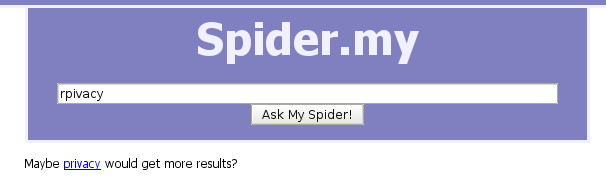
Suggested word for typo in search box
Some updates on this topic are available:
Damerau-Levenshtein algorithm: Levenshtein with transpositions
Damerau-Levenshtein in Java
2009 Apr 16 update – see the Damerau Levenshtein page for latest version
4 Responses to “Search suggestions with MYSQL Levenshtein distance”
By David Herring on Jun 23, 2010 | Reply
To install on OpenSuse 11.1, need -fPIC in compile
g++ -I/usr/include/mysql/ -fPIC -o libmysqllevenshtein.so -shared mysqllevenshtein.cc
By Lisa on Oct 22, 2010 | Reply
I’d love to get this installed – seems to compile OK on OpenSuse with -fPIC,
% g++ -fPIC -I/usr/innodb/include/mysql -o libdamlevlim.so -shared damlevlim.cpp
and I can create the function in mysql, and it finds the function gives appropriate errors (ie. DAMLEVLIM() requires three arguments) – but when it tries to work it gives this:
mysql> select damlevlim(‘knight’, ‘knite’, 3);
ERROR 2013 (HY000): Lost connection to MySQL server during query
I’ve tried this on mysql 5.0 and 5.1. Same result with the levenshtein function from JoshDrew.com. Figuring it’s some compile issue… ughg! -L
By Sean on Oct 22, 2010 | Reply
Not sure what to suggest – is there nothing in the MySQL log? That error 2013 covers a lot of possible reasons for failure – it might be worth checking your setup against reports such as those here:
http://bugs.mysql.com/bug.php?id=9752